Schoolmate
  • Home
  • Blog
  • Prices
  • Tutorials
  • Contact
  • FREE 30-DAY TRIAL
  • Home
  • Blog
  • Prices
  • Tutorials
  • Contact
  • FREE 30-DAY TRIAL

Labels

  • Wednesday July 25, 2018
  • John Kiely
  • Study Drive
July 25, 2018 John Kiely

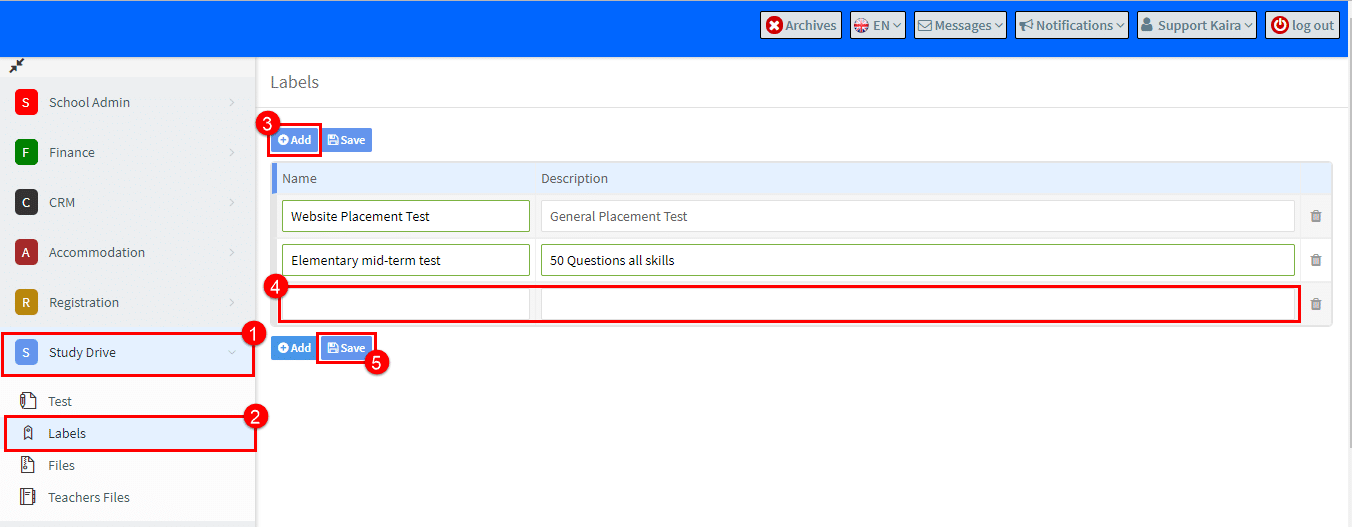
This is where we add the titles and descriptions to be given to our tests.

  1. Go to Study Drive.
  2. Go to Labels.
  3. Click Add.
  4. Put the name of the test and a description.
  5. Click Save.

Labels

You will see these items appear as drop-down choices when creating a test on the “Additional information” card.
MOST POPULAR ARTICLES

  • Back to Main Tutorials Menu

    How to…Study Drive

    • Finance 1
    • Reports
    • Teacher & Student User Guides
    • Teacher User Guide 1
    • Main Page 1
    • Accommodation Part 1
    • Finance 2
    • Teacher User Guide 2
    • School Admin
    • Accommodation Part 2
    • Main Page 2
    • How to.........1
    • Settlements 1
    • Student User Guide 1
    • Finance
    • Settlements 2
    • How to ..........2
    • CRM Module
    • Student User Guide 2
    • School Admin - Groups Part 1
    • Getting Started FAQs 1
    • Registration
    • Payments 1
    • Payments 2
    • School Admin - Groups Part 2
    • Study Drive
    • School Admin - Students 1
    • Financial Integrations 1
    • Reports
    • Financial Integrations 2
    • Resources
    • School Admin - Students 2
    • Academics
    • Finance FAQS 1
    • Teachers 1
    • Teachers 2
    • Surveys
    • Finance FAQS 2
    • Online Payments
    • Companies 1
    • Accommodation
    • Companies 2
    • Settings 1
    • Settings 2
    • Other School Admin Menu Items 1
    • Other School Admin Menu Items 2
    • Tips & Tricks 1
    • Tips & Tricks 2
    • School Admin FAQs 1
    • School Admin FAQs 2

    Latest Articles

    • Telegram BOT Setup Guide
    • Italian Accounting Software Integration
    • SchoolMate and Holded Integration
    • How to Generate Time Tracking Records
    • How can I send a reminder about a payment?
    • Quick links

      • Home
      • Blog
      • Prices
      • Tutorials
      • Contact
      • FREE 30-DAY TRIAL
    • Blog

      • Bulk Messaging from SchoolMate via WhatsApp/Viber/Telegram May 12, 2026
      • SchoolMate now integrates with Holded — seamless invoicing for Spanish language schools April 6, 2026
    • contact

      SchoolMate S.L. Calle Fuencarral 139, 2C, Madrid, 28010, España.
      info@schoolmate.eu
      +34 689337225
    © 2026 All rights reserved.