How to Integrate SmartBill with SchoolMate.
Why have we integrated with SmartBill?
SchoolMate includes a built-in financial module that handles standard invoices and receipts. However, the European Union is progressively requiring member states to adopt mandatory electronic invoicing and real-time financial reporting. Adapting a single generic accounting system to meet the distinct legal and tax requirements of every country in which our schools operate is not feasible.
Our solution is to integrate SchoolMate with best-in-class localised accounting platforms — so that each school uses software that is already fully compliant with its own country’s regulations, and stays compliant as those regulations evolve. The SmartBill integration is tailored for schools operating in Romania.
Who is SmartBill?
SmartBill is a cloud-based invoicing and business management platform widely used by small and medium-sized businesses in Romania. With more than 160,000 active users, it offers a comprehensive range of financial and administrative tools.
Its main features include:
- Invoicing & E-Invoicing: Create, send, and manage invoices, proforma invoices, credit notes, and electronic invoices compliant with Romanian tax regulations.
- Automated Tax Compliance: Submit and retrieve electronic invoices through Romania’s ANAF e-Factura system and generate required tax reporting documents.
- Accounting & Financial Management: Manage income, expenses, VAT, payments, bank transactions, and financial reports.
- Online Banking Integration: Connect bank accounts to import transactions, match payments against invoices, and simplify bank reconciliation.
How does the integration work?
First you need a SmartBill account to link to your SchoolMate account – the steps are explained below. There is a link from a student in SchoolMate to their SmartBill account.
You create and manage invoices directly in SmartBill. Relevant information, including invoice summaries and payment statuses, is then transferred back to SchoolMate, where it is displayed on the student’s or company’s card.
This gives you the benefits of SmartBill’s specialised invoicing and accounting features while retaining an overview of your school’s finances within SchoolMate.
How do I integrate SchoolMate with SmartBill?
Before setting up the integration, you need to create a SmartBill account. You can start with a free demo account and upgrade to a paid subscription later.
- Go to SmartBill and register for an account.
- Click on “Începe gratuit”
- Follow the registration instructions to create your account.
After you have created your account
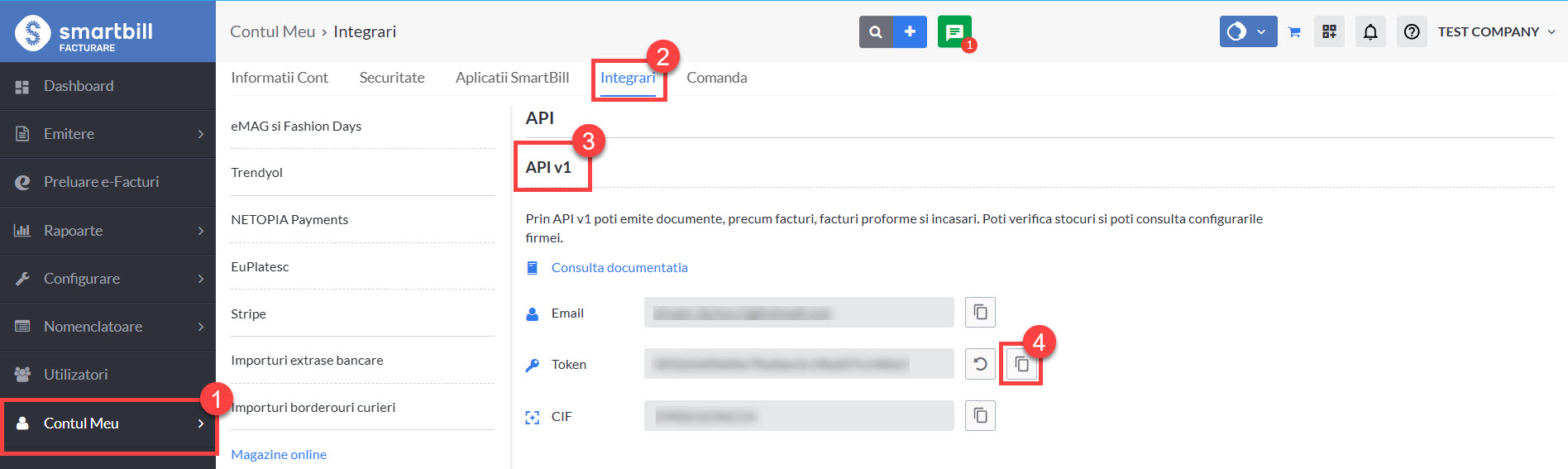
- Go to “Contul meu”.
- Go to “Integari”.
- Go to APIv1
- Copy the API token.
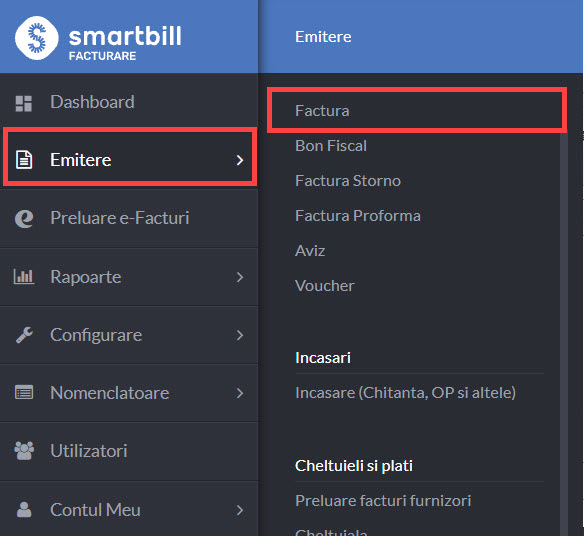
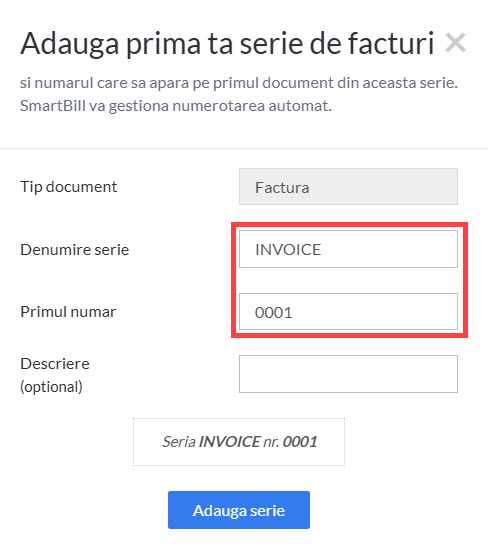
You will also need to create a numbering system in your SmartBill account. Go to Emitere – Factura
Select the appropriate option to configure your invoice numbering series. The following screen will allow you to specify the numbering details.
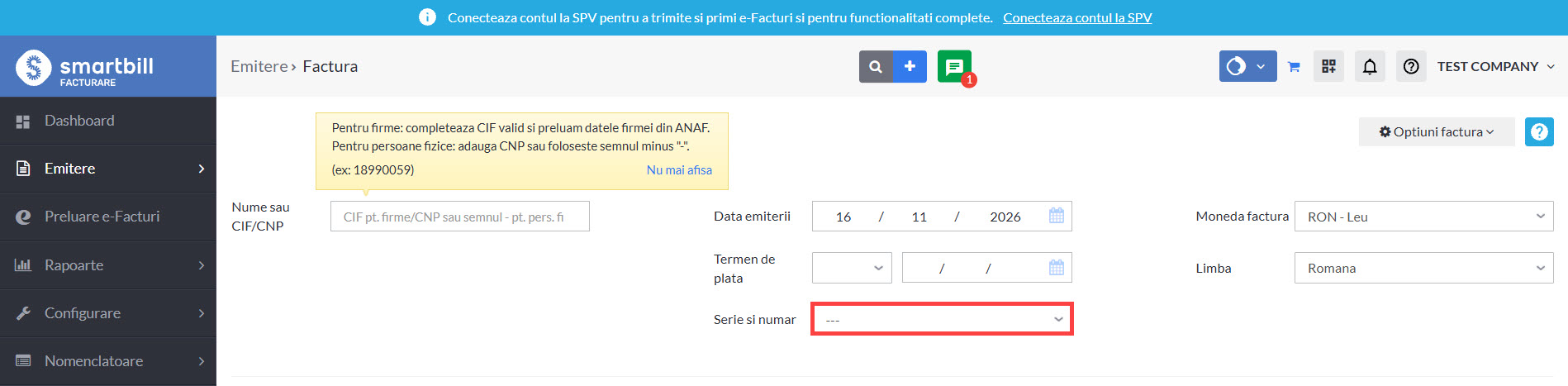
Click on the above box and the following will appear:
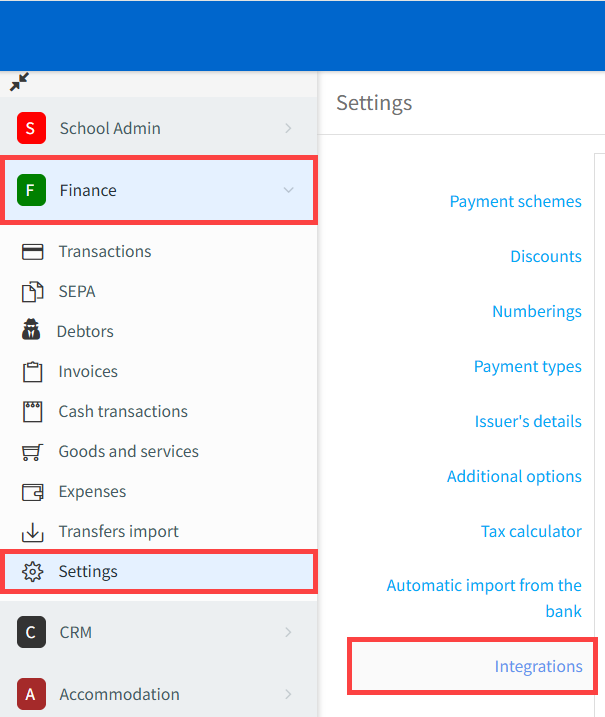
Now log in to your SchoolMate account and go to: Finance → Settings → Integrations
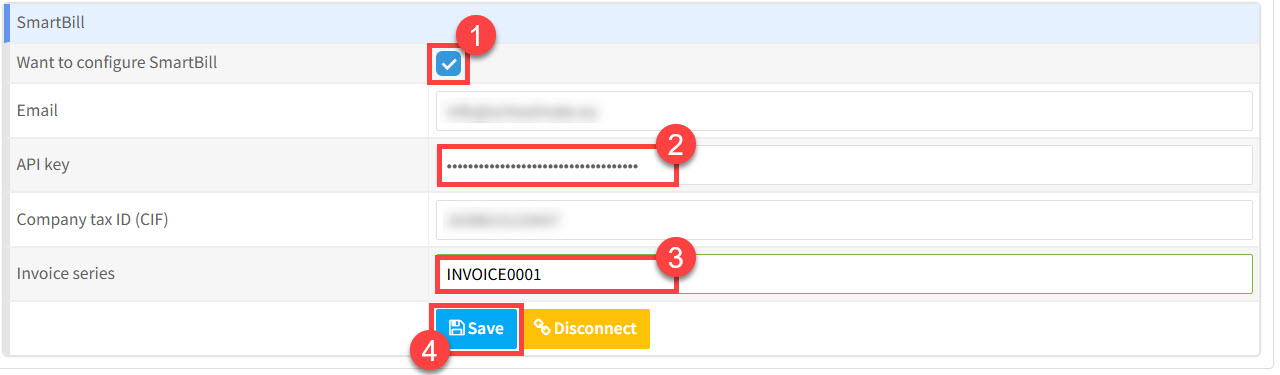
On the Integrations page:
- Select “Want to configure SmartBill“.
- Paste your SmartBill API token into the API Key field.
- Enter the invoice numbering series you created in SmartBill.
- Fill in the other fields and click “Save“.
Using SchoolMate and SmartBill
Once the integration is active, you can access SmartBill directly from a student’s card in SchoolMate.
When you open a student’s profile in SmartBill for the first time, their information is transferred automatically from SchoolMate. This creates the corresponding contact profile in SmartBill, ready for invoicing.
Please note: Changes made to a student’s billing information in SchoolMate after their initial transfer are not automatically synchronised with SmartBill. If the information changes, you will need to update it in SmartBill separately.
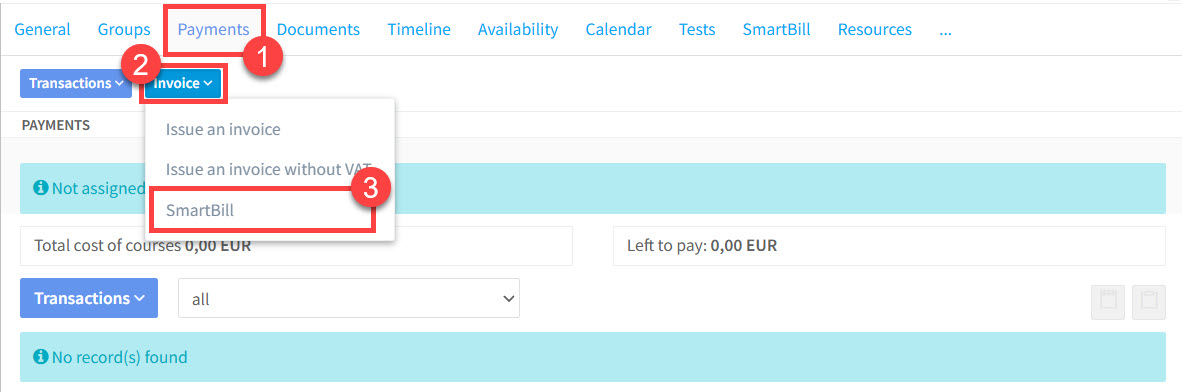
You can also access SmartBill directly from the student’s payment card in SchoolMate. Simply click the relevant option to open their SmartBill profile, where you can create and manage invoices.
Invoicing for parents
If a student is a minor and has an active parent account linked to their SchoolMate card, the parent rather than the student will be created as the contact in SmartBill for invoicing purposes.
Use the same method on the student card (see above) to access the parent’s SmartBill profile.
Invoicing for companies
Companies created in SchoolMate work the same way as students in SmartBill. Go from the company’s payment card and go straight to invoicing in SmartBill:
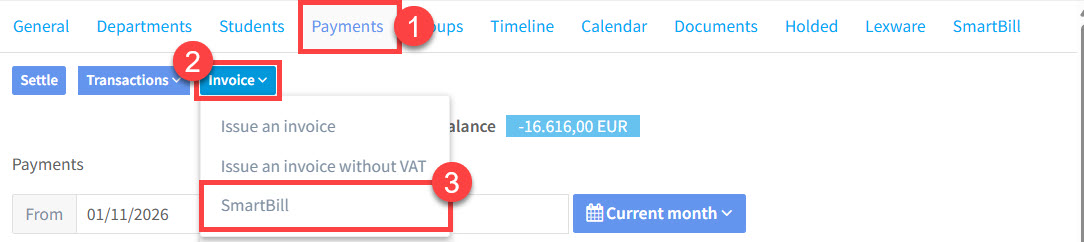
Invoicing with SmartBill:
All invoices are created and managed directly within SmartBill, which provides a comprehensive range of invoicing features, as well as its own tutorials and support resources.
A few important points to remember:
- Invoicing takes place in SmartBill: You do not create SmartBill invoices using SchoolMate’s built-in Finance module.
- Romanian tax compliance: SmartBill handles the relevant Romanian electronic invoicing requirements, including integration with the ANAF e-Factura system.
- Automatic information transfer: Invoice summaries and payment statuses are transferred back to SchoolMate in real time.
SmartBill information on the Student’s Card:
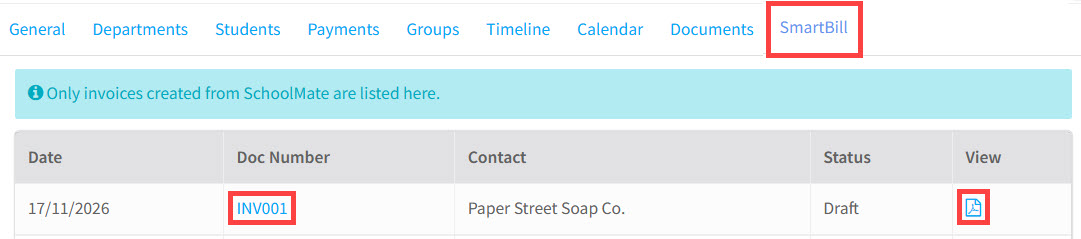
A dedicated SmartBill tab has been added to every student’s card in SchoolMate.
This tab displays a summary of the student’s SmartBill invoices, together with their current payment statuses. You can therefore check outstanding invoices and review a student’s invoicing history without having to open SmartBill.
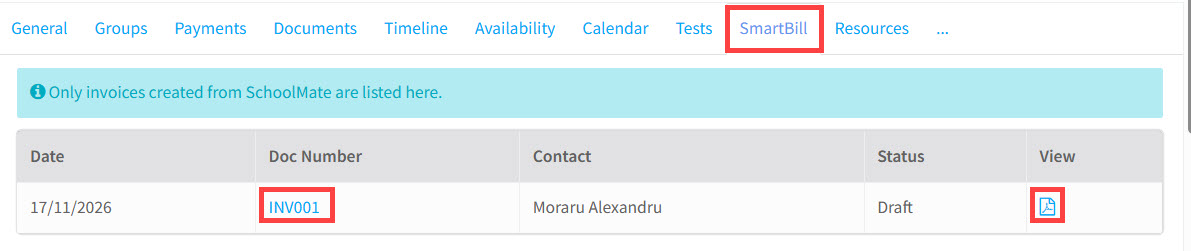
SmartBill information on the Company’s Card:
The same functionality is available on company cards in SchoolMate.
Each company has its own SmartBill tab, displaying a summary of its invoices and payment statuses. This makes it easy to monitor company billing and outstanding payments directly from SchoolMate.